![Jitsu-color.png]](https://gojitsu.com/hs-fs/hubfs/Jitsu-color.png?height=40&name=Jitsu-color.png)
|
📋 POD Requirements by Delivery Type |
|
|
Delivery Type |
Photo Requirement |
|
🏠 |
Standard Residence (Home) |
1 photo minimum: package in front of house number and door. If you cannot capture both clearly in one shot, take multiple photos. |
|
🏢 |
Apt/Condo Building — Access Gained |
1 photo minimum: package in front of unit/apartment number and unit door. Deliver to the unit door — not the lobby or main entrance. |
|
📬 |
Apt/Condo Building — Mailroom Only |
2 photos required: (1) package in front of building number/exterior entrance, and (2) package placed inside the mailroom. |
|
📸 When to Take Multiple Photos |
|
When in doubt, take more photos. A complete set of pictures is always better than one unclear shot — this protects you and confirms the delivery. |
Even at standard residences and apartment or condo units, a single photo may not always capture everything clearly. Use your judgment — if the house number and the package at the door are difficult to show together (due to angle, lighting, or distance), submit multiple photos.
- Take 2+ photos any time the address number and the package cannot be clearly seen in a single frame.
- Shoot from different angles if one photo is blurry, backlit, or too far away to read the address.
- Always err on the side of more. An extra photo takes seconds and eliminates any dispute about the delivery.
- Offline? Save all photos to your phone and submit them to Dispatch as soon as you regain connectivity.
|
📷 Example Photos by Delivery Type |
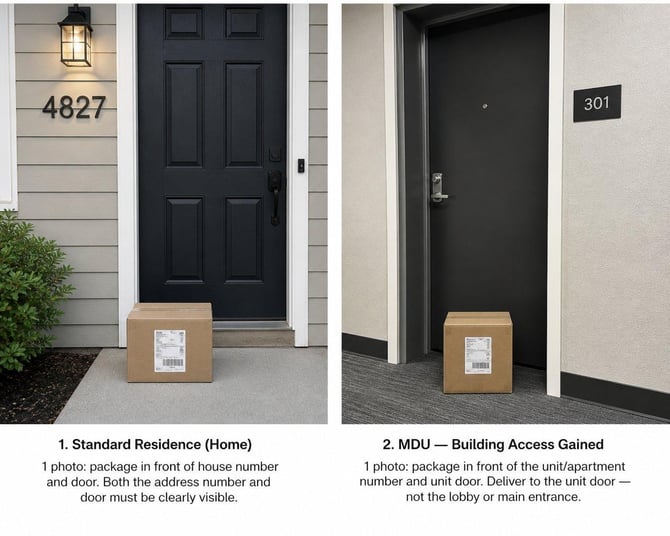
Standard Residence (Home) | Apt/Condo Building — Access Gained
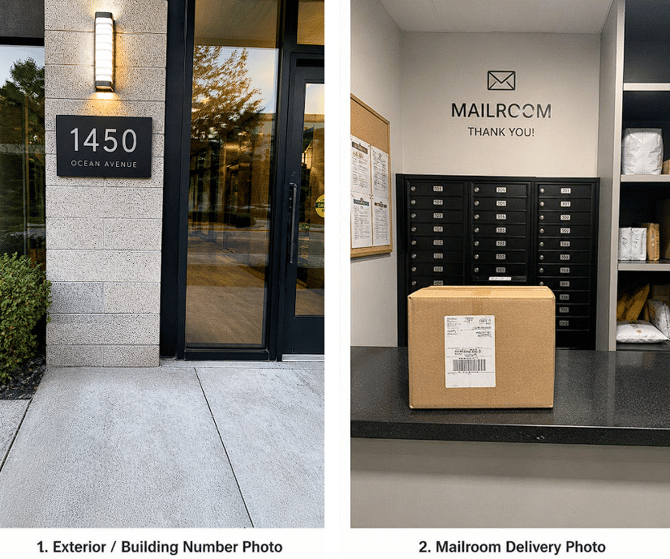
Apt/Condo Building — Mailroom Only: Photo 1 (Exterior) + Photo 2 (Mailroom)
BOTH photos are required!
|
✅ General Best Practices |
- Deliver to the correct door. Always deliver to the customer's front door or unit door — not the lobby, gate, mailbox, or mailroom unless building access is unavailable.
- Capture the essentials. Every POD must show: the package, the house or unit number, and the door — all in a single frame when possible.
- When in doubt, take more photos. If you can't get everything in one clear shot, submit multiple. This always acceptable and often expected.
- Use your flash in low-light conditions to ensure the photo is clear and legible.
- Handoff to customer: If you hand the package directly to a resident, photograph the address/door and add a note in the app that it was given to the customer.
- No internet? Save photos to your phone and submit to Dispatch as soon as you have connectivity.
- Access issues? Contact Dispatch immediately via the in-app messenger — do not skip the stop.
|
❌ Unacceptable POD Examples |
|
The photos below will NOT be accepted. Submissions like these may result in an unverified delivery. |
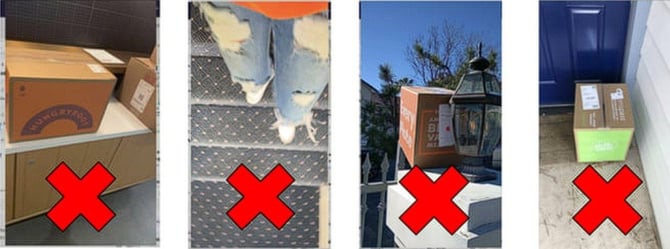
- No address or location visible in the photo.
- Package label only — no door or surroundings shown.
- Photos taken from inside your vehicle — too far away and unclear.
- Photos of people or body parts.
|
✅ More Acceptable POD Examples |
|
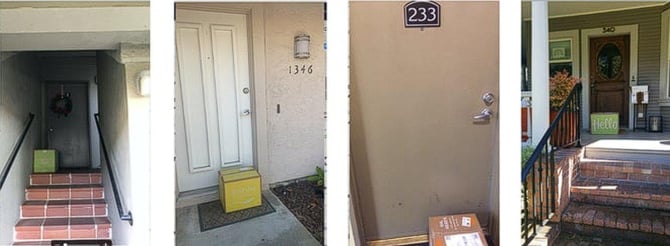
A good POD clearly shows the package, house/unit number, and door. When needed, use multiple photos to capture all required details. |
|
Questions or issues at a stop? Reach out to Dispatch immediately via the in-app messenger. It is the client's expectation to receive clear, visual proof of every delivery. Thank you for your attention to this — your professionalism makes a real difference. — The Jitsu Dispatch Team |