![Jitsu-color.png]](https://gojitsu.com/hs-fs/hubfs/Jitsu-color.png?height=40&name=Jitsu-color.png)
We are excited to share a new and improved parking process to help us better manage our parking spaces and the flow of drivers. We hope this new process will get you in and out of our warehouse more quickly so you can be on your way! We are currently in the process of rolling this out to more markets -- if you do not see this option, it may not have been rolled out to your market just yet.
Follow these new steps when arriving at the warehouse:
1. Select "I'm on my way" when you're heading to the pick-up location. Once you have arrived at the warehouse, press the "I've Arrived" button, and proceed to any available parking spot.

2. The app will prompt you to scan the QR code of an available parking spot. If no spot is open, please wait in line until one becomes available. After you have scanned into your space, please stay in the same spot. Moving to a different spot after confirming may delay the outbound team from bringing out your route.
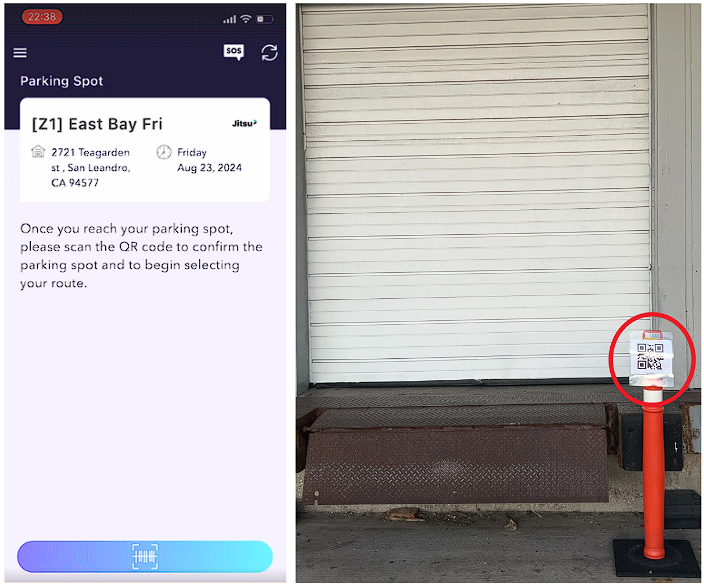
3. Be sure to have your Driver app and driver license ready. After confirming your parking spot, select 'Reserve' to continue, and you will be allowed to select your preferred routes via the Route Selection feature. The outbound clerk will check your ID when the route is brought to you, and once verified, you can proceed with your route as usual.

We hope you are as excited about these changes as we are, and don't forget to share feedback directly with us at drivers@gojitsu.com. We look forward to seeing you on the road!
Drive safe,
Team Jitsu
______________________________________________________